Usage
Required Files
-
single-cell RNA-seq data (cell types should be labeled): tabular data, seperated by TAB. The indices are cell types, the columns are gene names. It should be stored in txt format. For the deconvolution performance, we recommend users use TPM data as input.
-
bulk RNA-seq data: tabular data, seperated by defined symbols. The indices are sample name, the columns are gene names.
-
gene length file: If you want to normalize simulated data into TPM/FPKM format, you should specify the location of this file. Tabular data, seperated by TAB, columns should contain:
| Gene name | Transcript start (bp) | Transcript end (bp) |
|---|---|---|
Procedures
Understanding the whole procedure for deconvolution is very useful for you to master the flexible usage of TAPE. Here is the diagram:
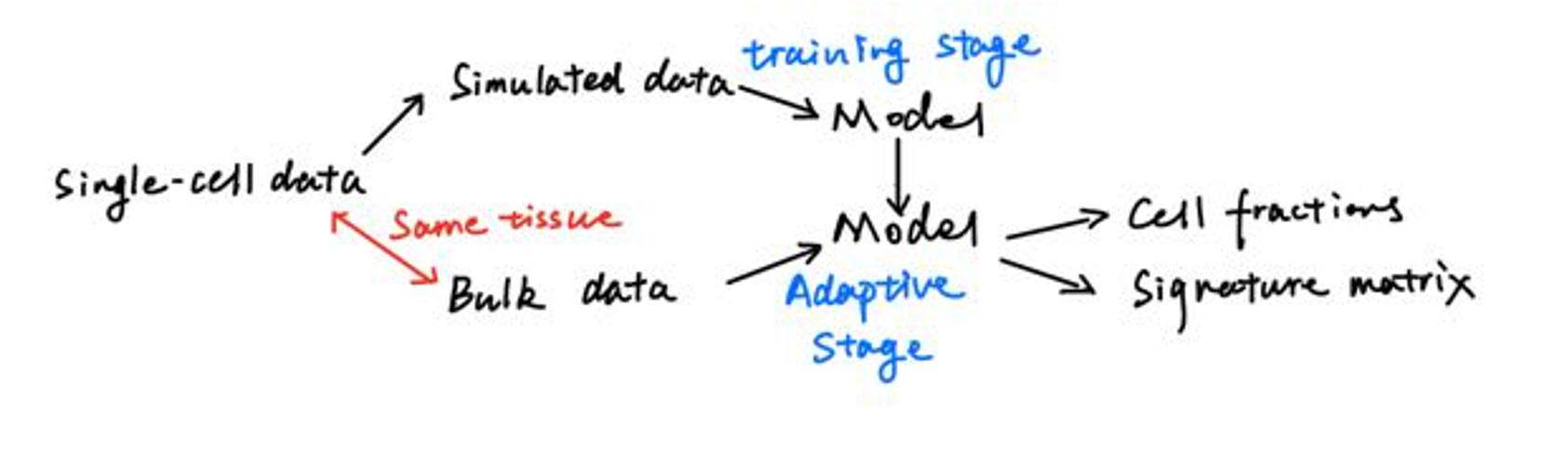
Obviously, given bulk data with single-cell data or simulated data or a trained model could produce the expected results. So, there will be three different ways to use TAPE. Since it is hard to guarantee that the intersected genes are the same when users try to use a trained model as start point, we only introduce two of them, starting from single-cell data or simulated data.
First way: from single-cell data to results
For convenience, we used a function to do this way:
# single-cell data -> results
from TAPE import Deconvolution
SignatureMatrix, CellFractionPrediction = \
    Deconvolution(sc_ref, bulkdata, sep='\t',
                  datatype='counts', genelenfile='./GeneLength.txt',
                  mode='overall', adaptive=True,
                  save_model_name=None,
                  batch_size=128, epochs=128)
parameters:
-
sep: '\t', ',' or ';', this depends on the seperation methods in your bulk data.
-
datatype: use 'TPM', 'FPKM' or 'counts'. The method to normalize pseudo-bulk data for training. Typically, if the single-cell data is from 10X Genomics, this parameter should be 'counts'.
-
mode: 'overall' or 'high-resolution'. In the 'high-resolution' mode, returned signature matrix will be a dictionary like {'cell type': gene expression data, ...} and the gene expression data is a dataframe. In the 'overall' mode, the signature matrix is a dataframe and the indices are cell types, the columns are gene names.
-
adaptive: True or False. If adaptive is False, then it would not predict signature matrix, the return will be None. If adaptive is True, the returned signature matrix format depends on the mode.
-
batch_size: int, related to training result. 32-128 are recommended. Smaller batch_size leads to more time consumption.
-
epochs: int, related to training result. Typically, 5000-10000 iterations are enough for TAPE, the relation is $epochs=\frac{iteration \times batch_size}{sampleing_num}$
Second way: from simulated data to results
Typically, users need to generate simulated data at first. This could be achieved through the following code:
# generate simulated data
from TAPE.simulation import generate_simulated_data
simulated_data = generate_simulated_data(sc_ref,
                                         outname=None, prop=None,
                                         n=500, samplenum=5000)
parameters:
- outname: a String to specify the name to save the simulated data. The saved file is a .h5ad file. This kind files could be read through the package AnnData.
- prop: ndarray shapes like [sample_number, celltype_number]. If this is None, the function will randomly create an array to sample the data.
- n: int. Specifying how many cells will be sampled for each pseudo-bulk data.
- samplenum: int. Specifying how many pseudo-bulk data will be created after sampling.
Then, users could use the following to make predictions:
# simulated data -> results
SignatureMatrix, CellFractionPrediction = \
    Deconvolution(simulated_data, bulkdata, sep='\t',
                  datatype='counts', genelenfile='./GeneLength.txt',
                  mode='overall', adaptive=True,
                  save_model_name=None,
                  batch_size=128, epochs=128)
Note that, the first parameter of this function could recieve a file location string or an object (DataFrame or AnnData) depends on different starting points.